An Android AI Chat App in 4 Days
1. Why I Built This
I have worked on Android at Meta for more than nine years.
Meta’s mobile tooling is excellent. The codebase, build system, dependency management, review flow, experimentation platform, release pipeline, monitoring, and infrastructure all have internal platforms behind them. That makes day-to-day work fast.
There is a downside, though: after relying on that environment for long enough, it is easy to lose touch with what modern Android development feels like outside Meta.
This year I have also been using agentic coding heavily at work. It clearly made me faster, but I wanted to know how much of that came from the workflow itself and how much came from Meta’s tooling. What still gets faster outside Meta? What new costs show up?
The only useful way to find out was to build something beyond a toy demo.
I chose a ChatGPT-style chat app because I use ChatGPT every day and know the interaction model well. It also touches many Android patterns naturally: lists and text input, conversation navigation, asynchronous state, streaming updates, local persistence, network boundaries, image picking, background state, notifications, error handling, and tests.
My original goal was modest: build a message UI. Codex moved faster than I expected, so the scope kept expanding: from one chat to multiple conversations, from in-memory state to Room persistence, from fake responses to real OpenAI streaming, and from text-only chat to image drafts and multimodal sends. What started as one screen became a small but reasonably complete AI chat app.
2. Timeline
- 4 days, 194 commits, 34,205 lines changed
- 35 design documents, including 12 implementation plans for the main build milestones
- 116 unit tests, 40 Android integration tests
- 545.7M tokens in Codex session accounting: 544.1M input tokens, 526.4M of them cached, and 1.7M output tokens
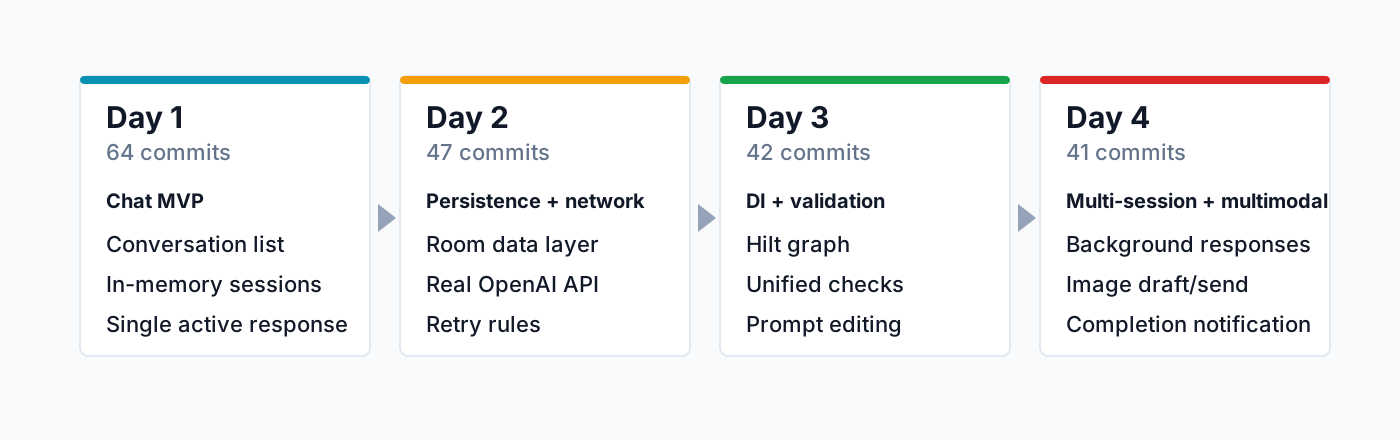
Day 1: Chat MVP, conversation list, single active response
- Built the smallest chat loop with hardcoded in-memory streaming responses.
- Added an in-memory conversation model and established the MVVM structure.
- Added the conversation list, conversation switching, and basic navigation.
Day 2: Persistence, network access, real OpenAI streaming
- Defined retry semantics, including how downstream messages are handled.
- Added Room and a persistence layer so conversations and messages survive restarts.
- Wired in the real OpenAI API to validate the network layer and streaming behavior.
Day 3: Dependency injection, automated validation, conversation history interactions
- Moved dependency wiring out of the Activity with Hilt.
- Put Detekt, ktfmt, unit tests, and Android integration tests behind one verification flow.
- Added prompt editing for previously sent user prompts.
Day 4: Multi-session background responses, image drafts, multimodal sends, completion notifications
- Let one conversation keep responding in the background while the user works in another.
- Added image upload and multimodal message support.
- Added completion notifications and handled foreground, background, cold start, and notification-tap routing.
The 12 milestones were intentionally narrow. Each one focused on a dedicated area: chat UI, data model, persistence, real streaming, dependency injection, automated validation, multi-session behavior, multimodal inputs, and lifecycle handling. Keeping the milestones small made the work easier to review, easier to validate, and less likely to drift out of scope.
3. Working with Codex
The starting prompt was small and intentionally framed around learning:
I am looking to start a toy ChatGPT-like app to help understand how ChatGPT works overall, along with modern Android frameworks such as Compose, DI, network, persistence, and MVVM.
The plan that came back was useful, but it also overwhelmed me with many decisions: state, ownership, persistence, retries, streaming, and tests. If I had sent Codex straight into implementation, it would have produced code quickly, but much of it would have been hard to trust.
So I turned the initial plan into a master milestone plan, then wrote two docs for each milestone:
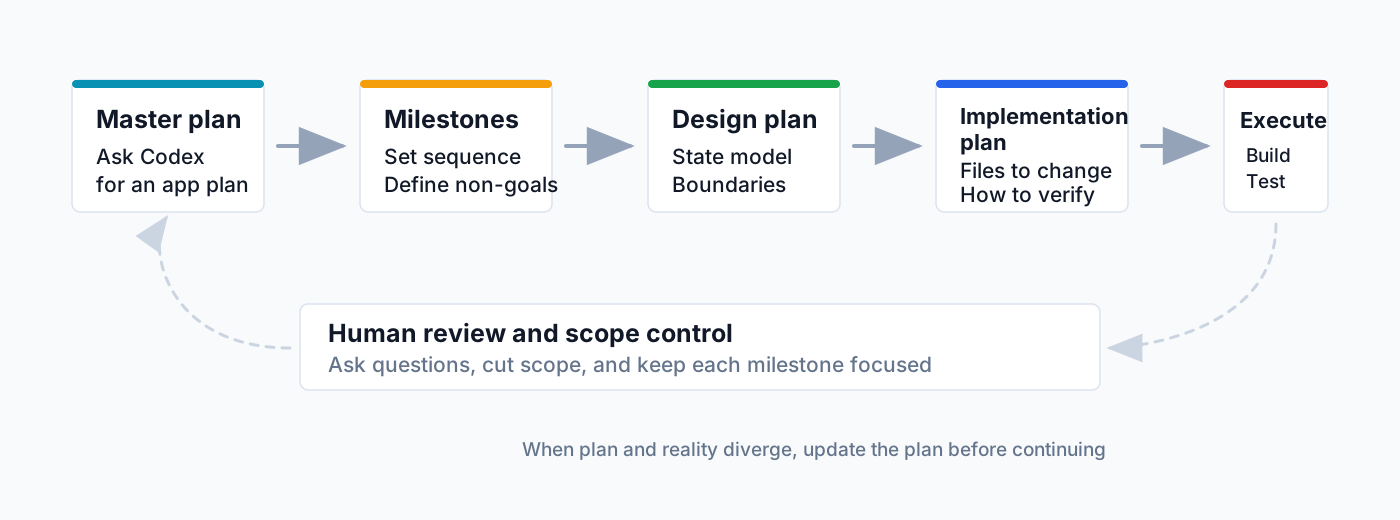
- A design plan for high-level architecture: state shape, ownership boundaries, non-goals, and tradeoffs.
- An implementation plan for reviewable execution: files to change, order of work, validation steps, and done-when criteria.
I also used OpenAI’s guidance on execution plans and Codex best practices as a checklist. Each implementation plan had to spell out the goal, context, constraints, and done-when.
The docs were context control. They boxed each Codex session and made scope creep easier to catch before it turned into code.
The time split makes that visible. Across 36 core build sessions, planning, review, and documentation took about 27 hours. Coding, testing, and repair took about 11.3 hours. Most of my time went into reviewing, revising, and narrowing the plans.
Could I have written fewer plans? Maybe. But mobile work still needs human judgment on product flow, state ownership, lifecycle behavior, persistence boundaries, and validation standards. Codex can generate code quickly. The hard part is making sure it generates the right code for the current stage.
4. App Architecture
Milestone by milestone, the toy app had evolved into a modern Android app: Compose UI, ViewModel state, testable reducers, local persistence, a real network layer, Hilt dependency injection, multimodal attachments, and device-side validation.
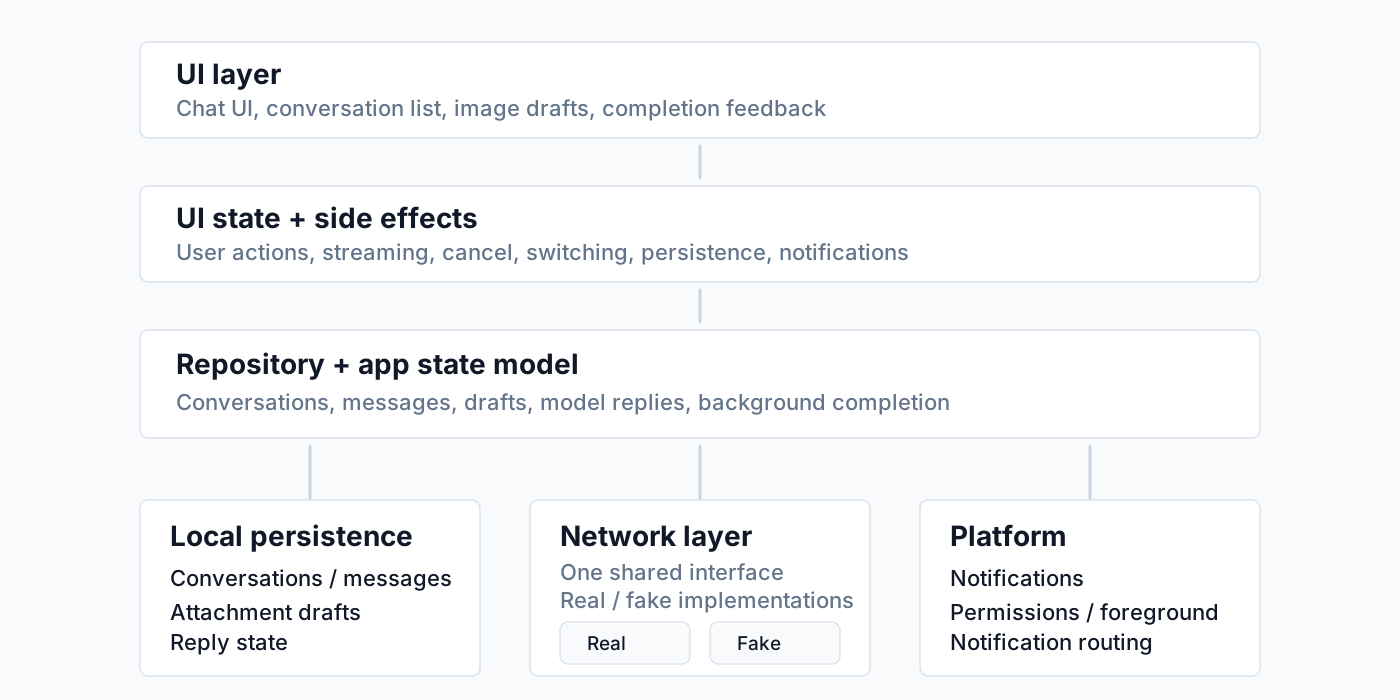
- View: Jetpack Compose owns the chat screen, conversation list, image drafts, and foreground completion feedback.
- ViewModel: the ViewModel coordinates user actions, model responses, persistence, and notifications. The actual state transitions are pushed into reducers so sending, streaming, canceling, switching conversations, and editing prompts can be tested on the JVM.
- Model: the domain model carries product semantics. Conversations, messages, attachment drafts, and response status all need to survive process restarts once persistence is introduced.
- Persistence: Room stores conversations, messages, response status, and attachment metadata so the app can recover stable history after process death.
- Network: the app can use in-memory streaming responses for local development or OkHttp with the real OpenAI API. Text replies use a streaming interface. Image attachments move from local draft state into upload and multimodal send flows.
- Dependency injection: Hilt keeps production wiring and test wiring separate, which makes the fake and real network paths interchangeable without changing the UI or ViewModel code.
- Validation: as the app grew, the validation surface grew with it: Detekt, ktfmt, Room DAO tests, Hilt smoke tests, Compose integration tests, and a small amount of manual emulator checking.
5. Implementation Details
5.1 Core Models
I intentionally kept the message model small. User messages and assistant messages are separate types, and assistant messages carry a status because streaming, completion, errors, and cancellation are visible product states.
Code: ChatMessage.kt
sealed interface ChatMessage {
  val id: String
  val conversationId: String
  val content: String
  val createdAtMillis: Long
}

data class UserMessage(
    override val id: String,
    override val conversationId: String,
    override val content: String,
    override val createdAtMillis: Long,
) : ChatMessage

data class GptMessage(
    override val id: String,
    override val conversationId: String,
    override val content: String,
    val status: GptMessageStatus,
    override val createdAtMillis: Long,
) : ChatMessage

enum class GptMessageStatus {
  Streaming,
  Complete,
  Error,
  Canceled,
}

data class GptMessageRef(
    val conversationId: String,
    val gptMessageId: String,
)
GptMessageRef points to the assistant message currently being streamed, and it includes the conversation id so a background response cannot accidentally update the visible conversation.
5.2 Streaming Model Service
The app has one model-service contract. Local scripted responses and the real OpenAI API implementation both return the same stream of events.
Code: ModelService.kt
interface ModelService {
  val mode: ModelServiceMode

  fun streamReply(request: ModelRequest): Flow<ModelStreamEvent>
}

sealed interface ModelStreamEvent {
  data class Delta(val text: String) : ModelStreamEvent
  data class Failure(val message: String) : ModelStreamEvent
  data object Complete : ModelStreamEvent
}
The local implementation emits hardcoded chunks. That made end-to-end flows testable locally: streaming, cancellation, and failure handling all run without calling the OpenAI API.
Code: FakeFastStreamingModelService.kt
override fun streamReply(request: ModelRequest): Flow<ModelStreamEvent> = flow {
  val chunks =
      listOf(
          "This is a fake ",
          "streaming response ",
          "from the local GPT service. ",
          "It arrives ",
          "chunk by chunk, ",
      )
  for (chunk in chunks) {
    delay(chunkDelayMillis)
    emit(ModelStreamEvent.Delta(chunk))
  }
  emit(ModelStreamEvent.Complete)
}
The OpenAI implementation uses the same return type. Internally it wraps OkHttp callbacks in callbackFlow, parses server-sent event lines, and cancels the HTTP call when the Flow is canceled.
Code: OpenAiStreamingModelService.kt
override fun streamReply(request: ModelRequest): Flow<ModelStreamEvent> = callbackFlow {
  val call = client.newCall(buildHttpRequest(request))
  call.enqueue(
      object : Callback {
        override fun onFailure(call: Call, e: IOException) {
          trySend(ModelStreamEvent.Failure(e.message ?: "OpenAI network error"))
          close()
        }

        override fun onResponse(call: Call, response: Response) {
          response.use { httpResponse ->
            if (!httpResponse.isSuccessful) {
              trySend(ModelStreamEvent.Failure(httpResponse.toFailureMessage()))
              close()
              return
            }

            val source = httpResponse.body.source()
            while (!source.exhausted() && !call.isCanceled()) {
              val line = source.readUtf8Line() ?: break
              parser.parseSseLine(line)?.let { event ->
                trySend(event)
                if (event is ModelStreamEvent.Failure || event is ModelStreamEvent.Complete) {
                  close()
                  return
                }
              }
            }
          }
          close()
        }
      }
  )

  awaitClose { call.cancel() }
}
5.3 Streaming into the Same Message
When a response starts, the ViewModel creates one empty assistant message with Streaming status. Every Delta then appends text to that same message. The UI should show one growing assistant bubble, not a new bubble for every chunk.
Code: ChatViewModel.kt
modelService
    .streamReply(ModelRequest(messages = requestMessages, attachments = attachmentRefs))
    .collect { event ->
      when (event) {
        is ModelStreamEvent.Delta -> appendToGptMessage(streamingRef, event.text)
        ModelStreamEvent.Complete -> finishGptMessage(streamingRef, GptMessageStatus.Complete)
        is ModelStreamEvent.Failure -> failGptMessage(streamingRef, event.message)
      }
    }
The append path first checks that the response is still the active running response for that conversation. Then a reducer replaces only the target message in messagesByConversationId.
Code: ChatViewModel.kt, ChatStateReducers.kt
private fun appendToGptMessage(
    streamingRef: GptMessageRef,
    delta: String,
) {
  if (_uiState.value.runningGptMessages[streamingRef.conversationId] != streamingRef) return
  _uiState.update { it.withAppendedGptDelta(streamingRef, delta) }
}

private fun ChatUiState.updateStreamingGptMessage(
    streamingRef: GptMessageRef,
    transform: (GptMessage) -> GptMessage,
): ChatUiState {
  val currentMessages = messagesByConversationId[streamingRef.conversationId] ?: return this
  val updatedMessages =
      currentMessages
          .map { message ->
            if (message is GptMessage && message.id == streamingRef.gptMessageId) {
              transform(message)
            } else {
              message
            }
          }
          .toPersistentList()

  return copy(
      messagesByConversationId =
          messagesByConversationId.put(streamingRef.conversationId, updatedMessages),
  )
}
Compose then reads the current conversation’s messages with stable message ids as keys. A streaming assistant message shows the same bubble plus a small streaming indicator.
Code: ChatMessageList.kt
LazyColumn(
    state = listState,
) {
  items(messages, key = { it.id }) { message ->
    when (message) {
      is UserMessage -> UserMessageRow(message = message, ...)
      is GptMessage -> GptMessageRow(message = message, ...)
    }
  }
}

@Composable
private fun AssistantMessageBubble(message: GptMessage) {
  Row {
    if (message.content.isNotBlank()) {
      Text(text = message.content)
    }
    if (message.status == GptMessageStatus.Streaming) {
      StreamingDots()
    }
  }
}
5.4 In-App and System Notifications
Background responses need two paths:
If the app is foregrounded, the user gets an in-app snackbar and can jump to the completed conversation.
Code: ChatScreen.kt
@Composable
private fun BackgroundUpdateSnackbarEffect(
    conversationId: String?,
    conversationTitle: String?,
    snackbarHostState: SnackbarHostState,
    onNoticeConsumed: () -> Unit,
    onOpenConversation: (String) -> Unit,
) {
  LaunchedEffect(conversationId) {
    val noticeConversationId = conversationId ?: return@LaunchedEffect
    val result =
        snackbarHostState.showSnackbar(
            message = "Response finished in ${conversationTitle ?: "chat"}",
            actionLabel = "Open",
            duration = SnackbarDuration.Short,
        )
    onNoticeConsumed()
    if (result == SnackbarResult.ActionPerformed) {
      onOpenConversation(noticeConversationId)
    }
  }
}
If the app is backgrounded, a system notification routes back to the right conversation.
Code: ChatViewModel.kt, BackgroundCompletionNotifier.kt
private fun maybeNotifyBackgroundCompletion(
    conversation: Conversation,
    gptMessage: GptMessage,
    status: GptMessageStatus,
) {
  if (status != GptMessageStatus.Complete) return
  if (appForegroundTracker.isForeground) return
  val preview = gptMessage.content.notificationPreview()
  if (preview.isBlank()) return
  backgroundCompletionNotifier.notifyCompletion(
      BackgroundCompletionNotification(
          conversationId = conversation.id,
          title = conversation.title.ifBlank { RESPONSE_READY_TITLE },
          preview = preview,
      )
  )
}
Most of the work is boundary handling: foreground state, notification permission, channel setup, cold-start routing, and the user’s current conversation all have to agree.
5.5 Room Persistence
Room stores stable product state: conversations, messages, attachment references, and terminal assistant status. Streaming is still UI state while it is in flight; the persisted model is the durable conversation history.
Code: MessageEntity.kt
@Entity(
    tableName = "messages",
    foreignKeys =
        [
            ForeignKey(
                entity = ConversationEntity::class,
                parentColumns = ["id"],
                childColumns = ["conversation_id"],
                onDelete = ForeignKey.CASCADE,
            )
        ],
    indices = [Index(value = ["conversation_id", "created_at_millis"])],
)
data class MessageEntity(
    @PrimaryKey val id: String,
    @ColumnInfo(name = "conversation_id") val conversationId: String,
    @ColumnInfo(name = "role") val role: MessageRoleEntity,
    @ColumnInfo(name = "content") val content: String,
    @ColumnInfo(name = "gpt_status") val gptStatus: GptMessageStatusEntity?,
    @ColumnInfo(name = "created_at_millis") val createdAtMillis: Long,
)
Retry and prompt editing are database transactions, not a sequence of ad hoc ViewModel writes. For retry, the DAO deletes downstream messages and replaces the target assistant response as one operation.
Code: ChatDao.kt
@Transaction
suspend fun persistRegenerationStart(
    conversationId: String,
    targetGptMessageId: String,
    oldTargetCreatedAtMillis: Long,
    preview: String,
) {
  deleteMessagesCreatedAfter(
      conversationId = conversationId,
      createdAfterMillis = oldTargetCreatedAtMillis,
  )
  deleteGptMessage(
      conversationId = conversationId,
      messageId = targetGptMessageId,
  )
  updateConversationPreview(
      conversationId = conversationId,
      preview = preview,
  )
}
5.6 Hilt Production and Test Wiring
Hilt keeps the app structure the same while swapping boundary dependencies. Production can expose the real OpenAI service when an API key exists; tests can use in-memory Room and scripted model services.
Code: ModelServiceModule.kt
@Provides
@Singleton
fun provideModelServices(
    fakeFastStreamingModelService: FakeFastStreamingModelService,
    fakeLongStreamingModelService: FakeLongStreamingModelService,
    fakeFailingModelService: FakeFailingModelService,
    openAiStreamingModelService: OpenAiStreamingModelService,
    openAiStreamingConfig: OpenAiStreamingConfig,
): PersistentMap<ModelServiceMode, @JvmSuppressWildcards ModelService> {
  val services =
      persistentMapOf<ModelServiceMode, ModelService>(
          ModelServiceMode.FakeFast to fakeFastStreamingModelService,
          ModelServiceMode.FakeLong to fakeLongStreamingModelService,
          ModelServiceMode.FakeFail to fakeFailingModelService,
      )

  return if (openAiStreamingConfig.apiKey.isNotBlank()) {
    services.put(ModelServiceMode.OpenAi, openAiStreamingModelService)
  } else {
    services
  }
}
Code: TestAppModule.kt
@Module
@InstallIn(SingletonComponent::class)
object TestDataModule {
  @Provides
  @Singleton
  fun provideChatDatabase(): ChatDatabase {
    return Room.inMemoryDatabaseBuilder(
            ApplicationProvider.getApplicationContext(),
            ChatDatabase::class.java,
        )
        .allowMainThreadQueries()
        .build()
  }

  @Provides
  fun provideChatDao(database: ChatDatabase): ChatDao {
    return database.chatDao()
  }
}

@Module
@InstallIn(SingletonComponent::class)
object TestModelServiceModule {
  @Provides
  @Singleton
  fun provideModelServices(): PersistentMap<ModelServiceMode, @JvmSuppressWildcards ModelService> {
    return persistentMapOf(
        ModelServiceMode.FakeFast to ScriptedModelService(ModelServiceMode.FakeFast),
        ModelServiceMode.FakeLong to ScriptedModelService(ModelServiceMode.FakeLong),
        ModelServiceMode.FakeFail to ScriptedModelService(ModelServiceMode.FakeFail),
    )
  }
}
The integration tests still launch real Android components with Compose, Hilt, Room, and an Activity. Network and data dependencies are replaced with fake in-memory Hilt modules, but the app structure stays the same.
6. Tests and Validation
6.1 Layered Tests
Initially the project did not need a heavy validation stack. Unit tests covered the first few milestones well enough.
As the app grew, validation grew in layers:
- Unit tests cover reducers, ViewModel behavior, repositories, stream parsing, OpenAI streaming, and fake model services.
- Android integration tests cover Compose interactions, Hilt replacement, Room database behavior, Activity launch, stable selectors, and end-to-end app flows.
- adb/emulator smoke checks cover the parts that are hard to express in deterministic tests: visual rhythm, permission prompts, backgrounding, notification taps, and cold-start routing.
The current app has 116 unit tests and 40 Android integration tests. Message history, persistence, dependency replacement, streaming, image drafts, and notification routing all have automated checks.
Below is one representative integration test. It drives the real Activity through Compose, uses Hilt test modules and a scripted model service, and verifies that editing an early prompt deletes downstream history before streaming a fresh answer.
Code: MainActivityHiltSmokeTest.kt
@Test
fun promptEditUpdatesPromptDeletesDownstreamAndStreamsFreshAnswer() {
  ActivityScenario.launch(MainActivity::class.java).use {
    // Build two turns so editing the first prompt has downstream history to remove.
    sendPrompt("edit original")
    waitForSingleConversationMessages("edit original", "edit answer 1")
    sendPrompt("downstream follow up")
    waitForSingleConversationMessages(
        "edit original",
        "edit answer 1",
        "downstream follow up",
        "downstream answer",
    )

    // Edit the first user prompt through the real Compose UI.
    composeRule
        .onNodeWithTag(ChatTestTags.editUserPromptButton(firstUserMessageId()))
        .performClick()
    composeRule.onNodeWithTag(ChatTestTags.PromptInput).performTextClearance()
    composeRule.onNodeWithTag(ChatTestTags.PromptInput).performTextInput("edited original")
    composeRule.onNodeWithTag(ChatTestTags.SendOrCancelButton).performClick()

    // The downstream turn is gone, and the edited prompt receives a fresh answer.
    waitForSingleConversationMessages("edited original", "edited answer")
    composeRule.onAllNodesWithText("downstream follow up").assertCountEquals(0)
    assertThat(singleConversationMessages().map { it.content })
        .containsExactly("edited original", "edited answer")
  }
}
6.2 Quality Gate
Starting from milestone 7, I put static checks, formatting, unit tests, and Android integration tests behind two Gradle tasks.
Code: build.gradle.kts
tasks.register("checkAgentic") {
    group = "verification"
    description = "Runs Android Lab static checks, unit tests, and connected Android tests for agentic changes."
    dependsOn(
        ":app:lintDebug",
        ":app:detektMain",
        ":app:detektTest",
        ":app:ktfmtCheck",
        ":app:testDebugUnitTest",
        ":app:connectedDebugAndroidTest",
    )
}

tasks.register("checkAgenticFast") {
    group = "verification"
    description = "Runs the fastest Android Lab static check for local agentic iteration."
    dependsOn(
        ":app:detektMain",
        ":app:detektTest",
        ":app:ktfmtCheck",
    )
}
checkAgenticFast is the quick local loop. checkAgentic is heavier and runs when a change touches UI, Room, Hilt, lifecycle, or end-to-end behavior.
This changed how Codex worked. It could now run a longer loop inside one session: read the failure, patch the responsible layer, and rerun the original failure before handing the change back. I also added a Failure Repair Loop to AGENTS.md: reproduce the smallest failure, write a concrete hypothesis, add the smallest diagnostic signal, fix the responsible layer, then rerun the original failure and the full gate when needed.
The session data lines up with that change:
- Before the milestone 7 validation gate, implementation-heavy sessions averaged 16.25 real user prompts.
- After the gate, comparable sessions averaged 8 real user prompts.
- Obvious follow-up corrections dropped from 1.5 per session to 0.33 per session.
I would not read that as “tests made the agent smarter.” The better reading is that a clear validation boundary made completion easier to define. Codex had a way to repair mechanical failures inside the same session, and I had a cleaner signal for whether the result was ready to review.
Gradle checks still are not enough for a mobile app. Some issues only show up on a device: animation rhythm, image picker flow, notification permission timing, background return behavior, and notification cold-start routing. For those, I used a small amount of adb/emulator smoke checking instead of building a heavier mobile validation CLI for this lab app.
That split was enough for this project: unit tests for semantics, Android integration tests for component wiring, and adb/emulator smoke checks for device behavior.
7. The Good, the Bad and the Ugly
7.1 The Good
Codex accelerated the mechanical parts the most: implementation, test scaffolding, repair, and documentation sync.
This project took 36 core build sessions in 4 days. Planning, review, and documentation took ~27 hours. Coding, testing, and repair took ~11 hours.
Without Codex, my estimate is that a similar-quality app would take an experienced Android engineer 6-9 full-time engineering weeks:
- Detailed design/implementation plans
- Multiple conversations with persisted history
- Real OpenAI streaming, retry, and prompt editing
- Image drafts and multimodal sends
- Background responses with in-app and system notifications
- 116 unit tests, 40 Android integration tests, and a validation system
If I cut those artifacts and only built the happy path, a quick demo might take 2-4 weeks. But that would be a much less meaningful comparison.
Once the boundaries were clear, implementation moved quickly. Reducers, mappers, Room entities, Hilt wiring, test assertions, README updates, and design-doc sync are all good work for an agent. These are the parts engineers often delay because they are necessary but repetitive. With Codex, they became small enough to do immediately.
The validation gate also changed the workflow. Codex could implement, run checks, read failures, repair, and rerun checks inside one longer session. That used to require more manual intervention from me. With clear boundaries, Codex could fix many mechanical failures before I reviewed the result.
Parallel sessions mattered too. Once a milestone had a clear design plan and implementation plan, I could hand one session the implementation, another session a review or follow-up plan, and then inspect the results one by one. That did not remove review work, but it changed the throughput: waiting time turned into parallel draft, implementation, and validation work.
7.2 The Bad
What did not get compressed was architectural judgment.
- What belongs in this milestone, and what should wait.
- Which fields belong in the data model.
- Whether conversation history should be linear, branched, or versioned.
- Which state should be persisted, and which state should stay in UI memory.
- Whether prompt editing should only edit text or truncate downstream history and stream a new answer.
- Whether a background completion should switch the user back to that conversation or only notify them.
These decisions did not become easier. In some ways they became more intense. When code generation gets faster, design review and code review happen more often. A decision that used to appear once every week can show up several times in one day.
That raises the bar for the person driving the agent. You have to keep reviewing plans, checking code, cutting scope, and catching semantic drift at a much higher frequency. A junior engineer, or a non-engineer trying to “just prompt the app into existence,” would have a hard time keeping up with that pace without strong guidance and validation.
Codex also tends to overbuild when the plan is too broad. It will add fields, states, abstractions, and “complete” flows that sound reasonable but do not belong in the current milestone. If non-goals are vague, the next milestone leaks into the current one. The human work shifts from writing every line of code to defining boundaries, reviewing plans, cutting scope, and deciding whether validation is strong enough.
7.3 The Ugly
Agentic coding makes implementation inside clear boundaries much faster. It does not remove the core complexity of mobile development. It changes where the work concentrates.
It also has a real compute cost. The 36 core build sessions recorded about 545.7M total tokens, but most of that was cached input. If I apply GPT-5.5 API pricing to the rollout accounting, the estimate is about $402: about $88 for uncached input, $263 for cached input, and $50 for output. This is not my ChatGPT or Codex subscription bill, but it is a useful scale check: long-horizon agentic work is cheaper than weeks of senior engineering time, but it is not free.
A project that once needed one Staff engineer, a few Senior engineers, and a few Junior engineers for several months may now be possible with one experienced engineer running several Codex sessions. That creates real pressure on team shape and hiring. If companies need fewer implementation-heavy roles, where do new mobile engineers get trained?
The remaining mobile engineers will need to own more of the work around the code:
- Turn ambiguous product goals into self-contained, verifiable milestones.
- Write implementation plans and done-when criteria that agents can execute.
- Build validation systems that let agents enter a self-repair loop during long sessions.
I do not think agentic coding makes mobile engineering less valuable. It makes routine implementation less scarce. More of the job moves toward architecture judgment, plan review, scope control, and validation design.
That brings the experiment back to the question I started with. The external Android toolchain is very different from Meta’s internal environment, but the workflow pattern was the same: define the goal, break it into milestones, write design and implementation plans, turn human checks into automated validation, and review the result. This 4-day lab gave me a concrete answer: the tooling changes, but the agentic workflow still holds.
Tags: android, Codex, Agentic Coding, architecture, AI